- TESIGN / RADAR
- 2026.09.19
- Actual Budget
Actual Budget
Budgeting that stays on your device
WHO USES ITPeople who want to budget seriously but do not want to hand bank credentials to an app, and households sharing one budget across devices.
Use in the browser
A local-first budgeting app that keeps your finances on your own device, using envelope budgeting.
START IN 5 MINUTES ↓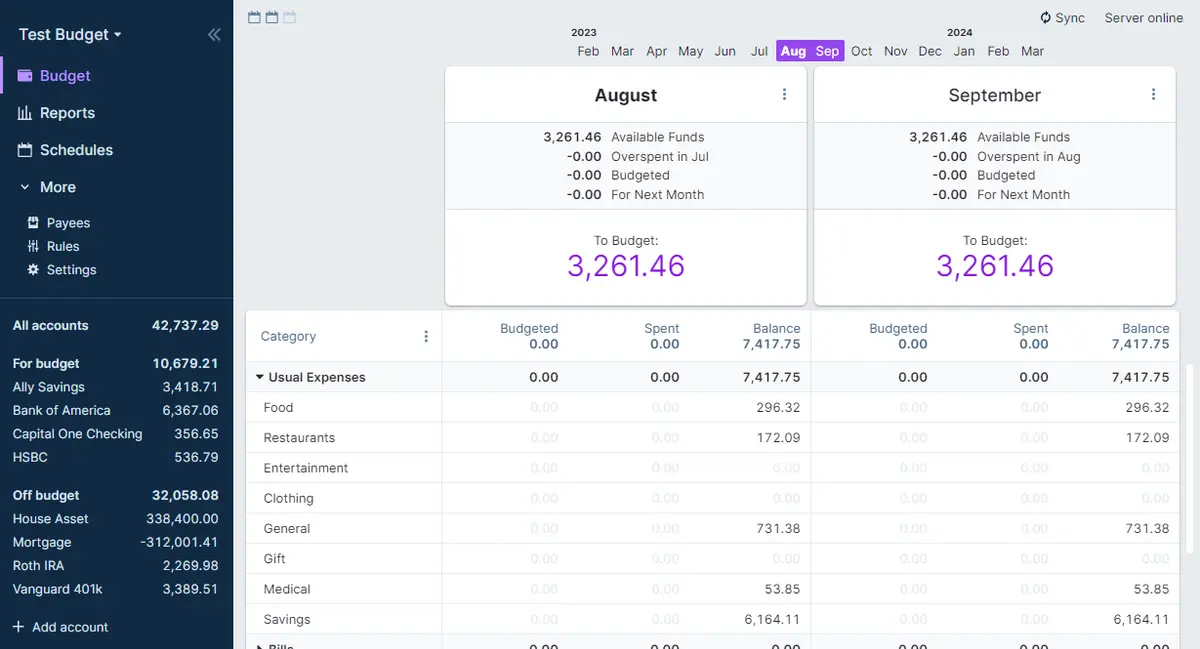
TESIGN TAKE
Having no bank sync looks like a drawback, but typing entries yourself is what makes the money actually visible. For one person on one machine, the desktop app alone is enough.
Activity and discovery evidence
29,930 stars · checked on GitHub · no 7-day star increase observed (GH Archive) (as of )
AT A GLANCE
- LICENSE
- MIT
- USAGE
- Use, change and redistribute, commercially too. Keep the notice.
- LANGUAGE
- TypeScript
- PLATFORM
- web · windows · macos · linux
- ACTIVITY
- last commit within 24 h () · latest release v26.11.0 () · 64 releases
- COMMUNITY
- 781 contributors · 214 open issues (incl. PRs) · made by: an organization
- SOURCES
- GitHub
- OPEN SOURCE
- YES
- FIRST SEEN
- CATEGORY
- FINANCE · PRODUCTIVITY
A summary, not legal advice.
WHY IT MATTERS
Most budgeting apps require a bank connection, and your transaction history lands on someone else's server. Actual inverts that: the data lives on your device, there is nothing to sign up for, and the whole source is open. You add a sync server only when you want the same budget on more than one device.
BUILD FROM THIS
- Written in NodeJS around the envelope budgeting method. Four ways to deploy: one-click PikaPods (~$2/month), managed Fly.io hosting (~$1.50/month), self-hosted Docker, or local-only desktop apps for Windows, Mac and Linux. Multi-device sync and optional end-to-end encryption are included.
WHO IT'S FOR
- People who want to budget seriously but do not want to hand bank credentials to an app, and households sharing one budget across devices.
START IN 5 MINUTES
# Open the demo at demo.actualbudget.org and click around the real app first, then download the desktop build. If you want it on several devices, PikaPods is the quickest route.CAVEATS
- Syncing across devices needs a server, and managed hosting costs about $1.50–$2 a month. Transactions are entered by hand or imported from a file.
RECEIPT
- FIRST SEEN
- AT SOURCE
- KEPT
- CREATED → FIRST SEEN
- 1600d
- WHEN FIRST SEEN
- 28,883 ★
- SOURCES
- GitHub
The same facts in machine-readable form — View as Markdown · JSON
SIMILAR TOOLS
Up to five from FINANCE by ★ total: edited entries first, then repository cards; this entry is highlighted. Drawn from the same stored snapshot as the rankings — a comparison, not a recommendation.
| IMAGE | NAME | ★ TOTAL | ▲ 7d | LICENSE | PLATFORM | LAST PUSH |
|---|---|---|---|---|---|---|
 | Actual BudgetBudgeting that stays on your deviceTHIS ENTRY | ★ 29.9k | — | MITpermissive | web · windows · macos · linux | |
 | OpenStockTrack prices and set your own alerts | ★ 21.1k | — | AGPL-3.0copyleft | web | |
| freqtrade/freqtradeCARD | ★ 54.3k | — | GPL-3.0copyleft | — | ||
| frappe/erpnextCARD | ★ 39.2k | — | GPL-3.0copyleft | — | ||
| nautechsystems/nautilus_traderCARD | ★ 28.9k | — | LGPL-3.0copyleft | — |
ALSO WORTH SEEING
TIMELINE
- Repository created
- FIRST SEEN BY TESIGN
- Published on TESIGN
SAME DAY
- 02
Harper
Offline English grammar checkingAn English grammar checker that runs on your own machine, so what you write never leaves it.
Use in the browser★ 17.4k - 03
ArcReel
Turn scripts into short-form videoA self-hosted workbench that turns a novel or script into characters, scenes, storyboards and finished short videos.
Self-host★ 6.1k - 04
OpenStock
Track prices and set your own alertsAn open-source dashboard for tracking stock prices, company details and personalised alerts in one place.
Use in the browser★ 21.1k - 05
Status Trio
One menu bar icon for three signalsA native macOS menu bar app that merges Wi-Fi, battery and volume into a single icon.
Install to use★ 1.4k - 06
liarjs
Check where a browser contradicts itselfReads what a browser says about itself, compares it with what the network actually saw, and reports every disagreement.
Use in the browser★ 4 - 07
MemOS
Give an AI agent long-term memoryA memory layer for LLM agents that unifies storing, retrieving and managing long-term memory.
For developers★ 12.2k - 08
Coder
Self-hosted cloud dev environmentsA self-hosted platform that moves development environments off laptops onto your own infrastructure, started on demand.
Self-host★ 17.3k - 09
Memoh
A cloud computer for every agentAn open-source platform that gives every AI agent its own cloud computer, running even when your laptop is closed.
Self-host★ 2.8k - 10
Atlassian MCP Server
Connect Jira and Confluence to AI toolsAtlassian's official bridge that lets AI tools read and act on Jira, Confluence and the rest of the platform.
Install to use★ 1.1k